
LifelineIQ Revenue
Work the claim with the chart and payer history beside it
Pre-billing, tasks, claims, payer follow-up, payments, month-end, revenue integrity, patient support, and records requests.

Inside the module
These three screens show what the team sees, what it works, and where the record goes afterward.
01
Pre-billing and claim workflow
02
Payer follow-up and payments
03
Revenue integrity and patient services
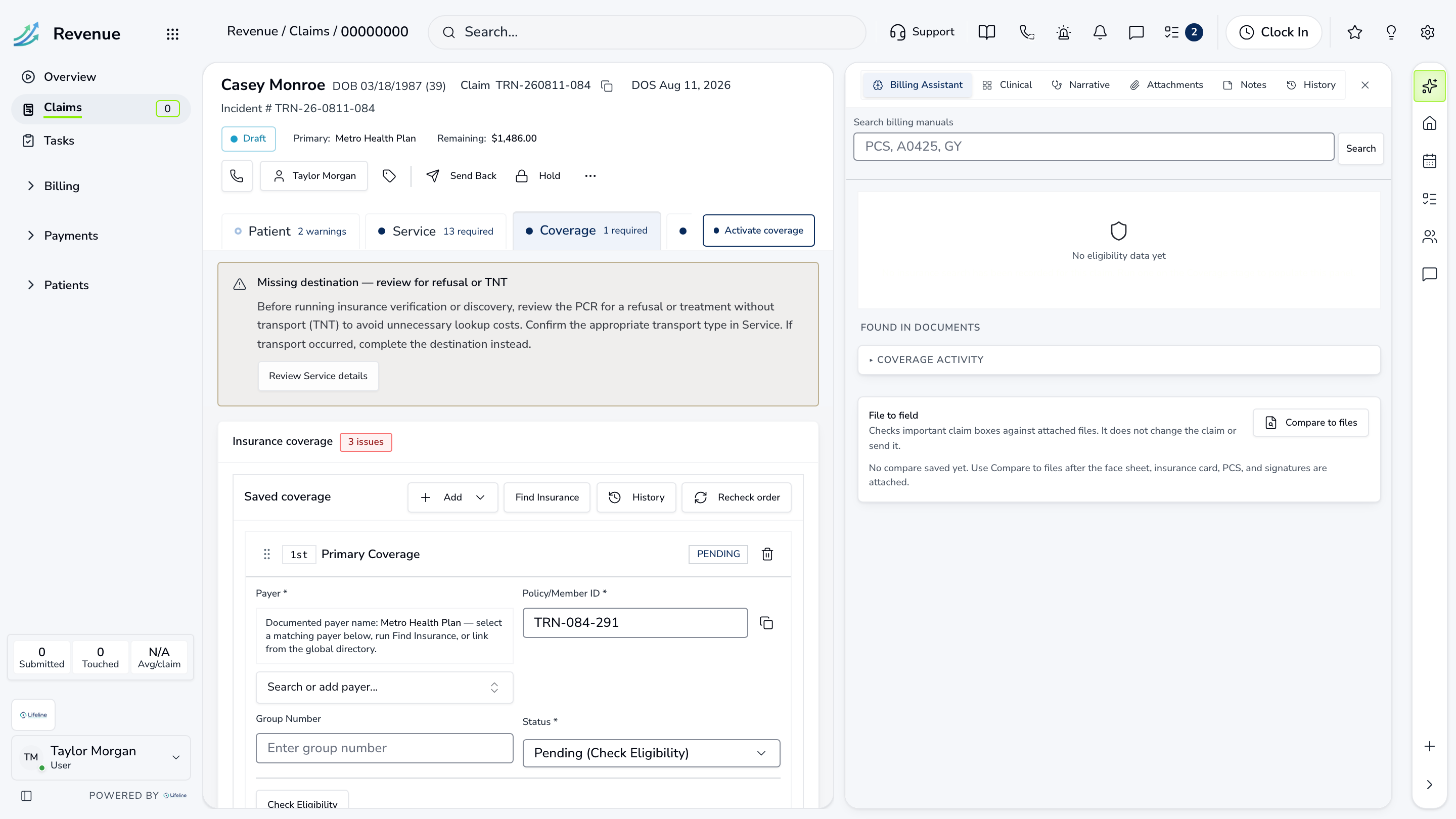
01 | The complete claim
Claim Record
Coverage, coding, charges, submissions, denials, payments, notes, and source documents are available from the claim.
Readiness
Submission requirements
What must be resolved first
History
Payer and team activity
Calls, notes, and responses
Balance
Charges and payments
The amount still outstanding

02 | Biller worklist
My Work
The biller sees assigned claims, current stage, payer, balance, and the next action without opening a separate tracker.
Priority
Claims to work
Ordered by urgency and value
Owner
Assigned biller
Who has responsibility now
Action
Open the claim
Work it beside the queue
Biller worklist
My Work
The biller sees assigned claims, current stage, payer, balance, and the next action without opening a separate tracker.
| Work item | Current view | Owner | Status | What happens next |
|---|---|---|---|---|
| Priority | Claims to work | K. Long | Needs attention | Ordered by urgency and value |
| Owner | Assigned biller | Billing team | In progress | Who has responsibility now |
| Action | Open the claim | Patient services | Ready | Work it beside the queue |
03 | Payer calls and responses
Payer Follow-Up
Follow-up is organized by payer and claim, with the last contact, promise, result, and scheduled return date.
Queue
Calls to make
A/R and aging beside each claim
Contact
Payer response
Notes added to the claim history
Next
Return date
When the biller should follow up again
Payer calls and responses
Payer Follow-Up
Follow-up is organized by payer and claim, with the last contact, promise, result, and scheduled return date.
Queue
Calls to make
A/R and aging beside each claim
Contact
Payer response
Notes added to the claim history
Next
Return date
When the biller should follow up again
Current work and evidence
Synthetic training-agency recordQueue · Calls to make
A/R and aging beside each claim
Contact · Payer response
Notes added to the claim history
Next · Return date
When the biller should follow up again
Everything in Revenue
Every page in the module.
These labels follow the current application navigation. Access varies by role and agency configuration.
Workspace
Payments
Revenue Integrity
Patient Services
Walk through Revenue with us.
Tell us how your team handles this work today. We will show you the current Revenue screens that match it, using fictional sample records.